A modern church service can include many different types of visual content. Congregations may need to follow worship lyrics, read Bible passages, watch videos, see announcements, and follow sermon references. Managing all of these elements manually can become difficult, especially when different files and applications are involved.
WorshipScreen offers a practical way to organize this work in one place. It is browser-based church presentation software created for displaying worship songs, Bible verses, sermons, announcements, images, videos, and other service materials. Churches can prepare their presentations in advance and then control the content while the service is taking place.
The platform can be useful for large churches with dedicated media teams as well as smaller congregations where a volunteer is responsible for the screen. Because WorshipScreen is available as a free solution, churches can build a complete visual presentation workflow without necessarily investing in expensive specialist software.
What WorshipScreen Does for a Church
The basic purpose of WorshipScreen is to connect the content of a church service with the screen that the congregation sees.
Instead of opening a separate program for lyrics, another application for Scripture, a video player for media, and image files for announcements, the church can organize these materials into a service playlist.
This makes preparation easier because the operator knows where the content is located. It also makes the live service more predictable because the presentation can follow the order of worship.
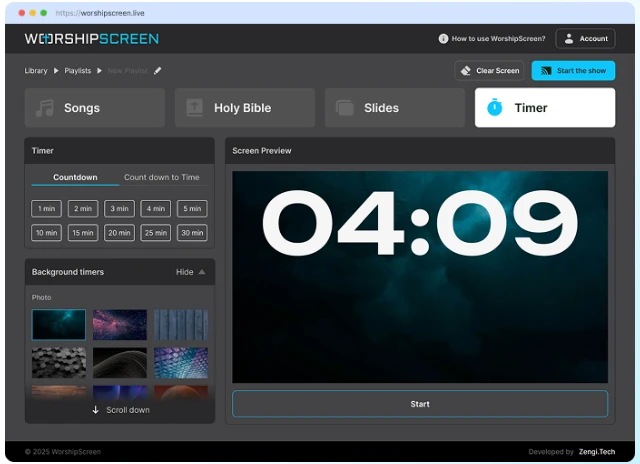
A typical playlist might contain a countdown, worship songs, a Scripture reading, announcements, a video, sermon verses, and a closing slide. The exact structure can be changed according to the needs of each congregation.
Starting With a Browser-Based Platform
One of the practical characteristics of WorshipScreen is that it works through a web browser.
The church can create an account and begin preparing its presentation content without going through a complicated software installation process. This can be particularly convenient when several volunteers are involved in operating presentations.
The first setup should focus on the basic visual appearance. The church can determine which fonts, text sizes, colors, and backgrounds provide good visibility on its particular screen.
The presentation should always be evaluated in the room where it will actually be used. A design that looks clear on a computer display may become too small or low-contrast when projected onto a large screen.
Creating a Church Song Library
A reusable song library is one of the most practical ways to reduce preparation time.
If a church sings the same worship songs regularly, there is little reason to recreate the presentation every week. Once the lyrics have been entered and checked, the song can be reused in future service playlists.
When a new song is added, the operator should review the lyrics carefully. Check the spelling, verse order, repeated sections, and slide breaks before using it during worship.
The text should be divided into short, logical sections. Congregation members need enough time to read each phrase while singing, so overcrowded slides can make participation more difficult.
A good song library becomes a long-term resource. As more songs are added, preparing a weekly service becomes increasingly a matter of selecting existing content rather than starting from an empty presentation.
Building the Service Playlist
After the basic content is prepared, the next step is to create a playlist for a specific service.
A Sunday service, for example, might be organized as follows:
- pre-service countdown;
- opening song;
- additional worship songs;
- prayer;
- Bible reading;
- church announcements;
- sermon Scripture;
- sermon presentation;
- closing song;
- final announcement.
Not every church will use this exact structure. The benefit of the playlist is that it can be adapted to any order.
The operator should prepare the playlist before the service and review it from beginning to end. This makes it easier to discover missing songs, incorrect Bible references, outdated announcements, or media that has not been added.
Displaying Worship Lyrics
Worship lyrics are often the most frequently displayed content during a service.
The purpose of the screen is not simply to show words. It needs to show them at the right moment and in a format that can be read by the entire congregation.
Large, clear typography is essential. The background should provide sufficient contrast, and the text should not be surrounded by unnecessary decorative elements.
The operator also needs to follow the music. If a slide is changed too early, people may lose their place. If it is changed too late, the congregation may already be singing a line that is not visible.
For this reason, presentation operation requires attention to both the screen and the service itself.
Preparing Bible Passages
Bible verses can be prepared in advance for worship, Scripture readings, and sermons.
If the pastor provides sermon notes before the service, the operator can add the relevant passages to the playlist in advance. This is particularly helpful when the sermon contains multiple references.
The operator should check the references and translations carefully. It is also important to make sure that long passages are divided into readable sections.
During the sermon, the operator can display the appropriate passage when the speaker reaches that part of the message.
This provides a simple way for the congregation to follow Scripture together without everyone needing to locate the reference individually.
Supporting Sermons With Presentations
Sermon presentations can contain more than Bible text.
Depending on the message, the church may want to display photographs, diagrams, quotations, maps, illustrations, or videos.
For example, a sermon about a biblical journey could include a map. A teaching series could use a consistent title image. A testimony could include a photograph or short video.
The key is preparation. If all the materials are already included in the service playlist, the operator does not need to search through computer folders while the pastor is speaking.
This allows the visual presentation to follow the sermon naturally.
Adding Church Announcements
Announcements are another common part of a church presentation.
Upcoming services, Bible studies, community activities, children’s programs, prayer meetings, conferences, and special events can all be displayed on screen.
The information should be concise. A congregation should be able to understand the main point of an announcement within a few seconds.
A useful announcement slide generally includes the event name, date, time, location if necessary, and any essential instructions.
Before each service, old announcements should be removed or updated. Reusing last week’s presentation without checking it can result in outdated information appearing on the screen.
Using Images as Part of a Service
Images can make a presentation more visually engaging, but they should be used carefully.
A church might use a photograph as a worship background, an image for an event announcement, or a visual illustration during a sermon.
The most important consideration is whether the image interferes with the text.
For worship lyrics, a highly detailed photograph can make reading difficult. A simpler background may work better. For announcement slides, an image can be placed alongside the essential information rather than behind it.
The visual style should support the message instead of becoming the main attraction.
Incorporating Videos
Videos are increasingly common in church services.
They can be used for announcements, testimonies, sermon illustrations, event introductions, missionary updates, or other purposes.
WorshipScreen supports video content and YouTube material, allowing these elements to become part of the overall service playlist.
However, online media requires additional preparation. The operator should confirm that the internet connection is stable and that the selected video plays correctly.
Audio should also be tested. A video may display correctly while its sound is routed to the wrong device.
Testing the entire video before the service is therefore essential.
Connecting the Presentation to a Projector or TV
WorshipScreen can be incorporated into different church display setups.
A simple arrangement may use a laptop connected to a projector. Another church may connect the computer to a large television or LED display.
An extended-display setup is particularly convenient. The operator can keep the control interface on the laptop while the congregation sees only the presentation output.
This prevents the audience from seeing the operator’s controls and allows the person running the service to prepare the next item privately.
The exact equipment will vary from church to church, but the workflow remains similar: one device manages the presentation while another display shows the content to the congregation.
Using Mobile Devices
A browser-based system can also provide flexibility in how presentations are controlled.
Depending on the church’s setup, a tablet or smartphone may be used to manage the presentation while another computer remains connected to the main display.
This can be useful for smaller churches where the person responsible for presentations also helps with other aspects of the service.
A mobile control device can also make it easier for an operator to sit somewhere with a clear view of the worship team or pastor rather than being restricted to a particular desk.
Preparing a Bilingual Service
Churches with multilingual congregations often need to display information in two languages.
Worship songs can be prepared with translations, while Bible passages can be shown in the languages most commonly used by the congregation.
The main challenge is maintaining readability. Two languages naturally require more screen space, so font size, line spacing, and slide structure need to be considered carefully.
If the screen becomes overcrowded, it may be better to divide the content into separate slides rather than attempting to display everything at once.
The goal is to help everyone participate rather than overload the presentation with text.
Free Worship Software for Church Volunteers
Many churches rely on volunteers to manage presentations. These volunteers may have very different levels of technical experience.
For congregations searching for free worship software, WorshipScreen offers a way to organize essential service materials without requiring a complicated professional production system.
The platform can be used for weekly worship, special events, Bible studies, prayer meetings, conferences, and other gatherings.
A volunteer can gradually learn the workflow: prepare the playlist, check the content, connect the display, and advance the presentation according to the service.
This makes the technology more approachable for churches without a dedicated technical department.
Methodist Worship Software for Church Services
Different denominations may organize worship in different ways, but many of their presentation requirements are similar.
Churches searching for methodist worship software can use WorshipScreen to prepare hymns and worship songs, Bible readings, sermon Scripture, announcements, and multimedia content.
The platform can accommodate a traditional service with hymns and Scripture as well as a contemporary service with modern worship songs, video, and visual backgrounds.
The church determines how the service is organized. WorshipScreen provides the presentation environment rather than imposing a particular format.
A Step-by-Step Weekly Preparation Process
A church can make its presentation workflow more efficient by following the same preparation process every week.
Step 1: Collect the Service Information
Obtain the worship song list, sermon references, announcements, and any videos or images that need to be shown.
Step 2: Select Existing Content
Use songs and other materials already stored in the church library whenever possible.
Step 3: Add New Materials
Create new songs, Bible passages, announcement slides, or media items when necessary.
Step 4: Build the Playlist
Arrange everything in the exact order in which it is expected to appear.
Step 5: Review the Text
Check lyrics, Scripture references, spelling, punctuation, and slide breaks.
Step 6: Test Multimedia
Play every video and check that audio is working correctly.
Step 7: Test the Screen
Connect the presentation to the actual projector, TV, or LED display.
Step 8: Rehearse the Service
Move through the playlist while imagining the actual service. Check whether transitions occur at appropriate moments.
This procedure turns presentation preparation into a repeatable task.
Operating WorshipScreen During a Live Service
The operator’s role continues after preparation is finished.
During worship, the operator should follow the worship leader and advance lyrics according to the music. During a sermon, the operator should listen for references to Scripture or other prepared material.
The playlist should not be treated as completely rigid.
If the worship team repeats a chorus, the operator should be able to return to